


Getting started with Vag-Com


Thread Starter
AudiWorld Member
Joined: Jan 2011
Posts: 365
Likes: 0
 Getting started with Vag-Com
So I got my Ross-Tech cable, installed the software and driver in a laptop, connected it to the car, and ran the communications test and saved the resulting configuration per the manual, which all worked fine.
Next I ran the checks for fault codes in all the installed modules, as the manual recommends. Here are the screen captures of the modules installed in my car (2012 prestige with sport diff):
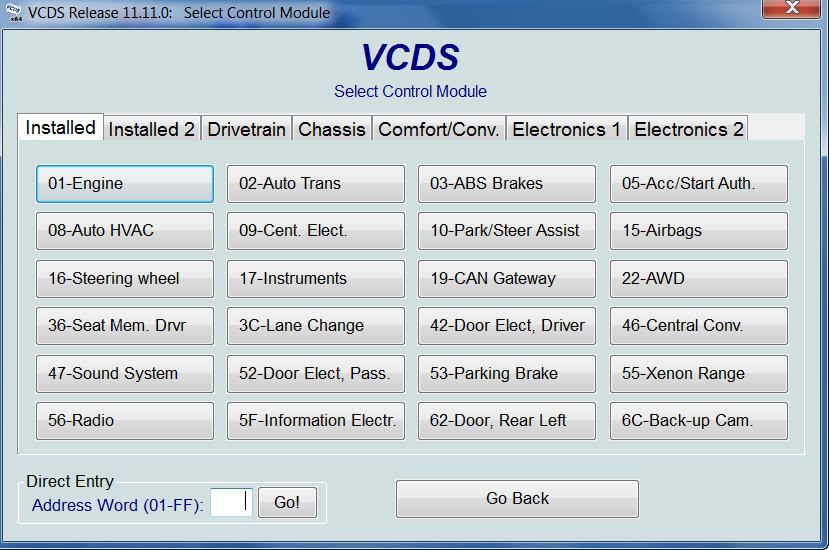
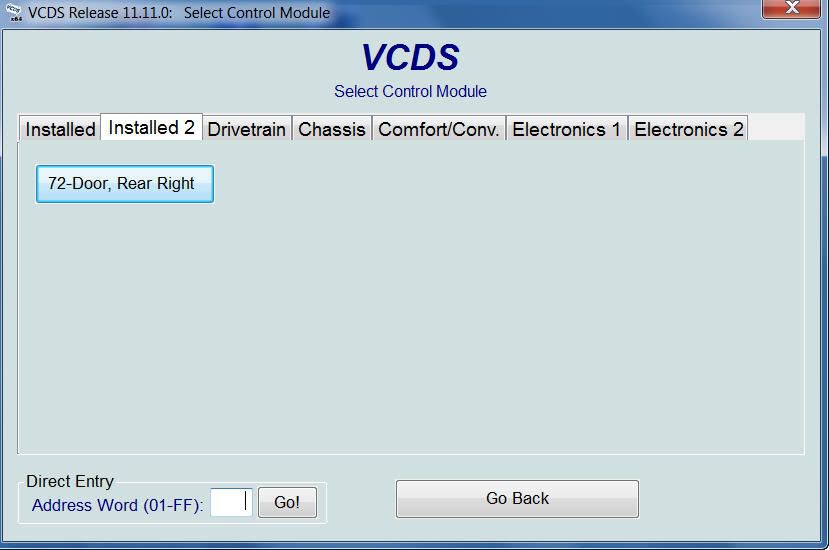
So, before I change anything, I suppose it's a good idea to save a copy of all the factory default settings/codes in all my installed controllers, just in case I need to revert back (or re-do everything if a service visit resets everything).
How do I do that (hopefully in one quick operation that saves all to one file, rather than having to save off each installed controller separately)?
Also, there are some "not installed" control modules in the other tabs that I would have expected would be installed for my car (such as "37 Navigation" in the Electronics-1 tab, and "1F Satellite tuner" in the Electronics-2 tab, and maybe a controller specific to the sport differential somewhere. Does it sound right that none of those were detected as installed?
Next I ran the checks for fault codes in all the installed modules, as the manual recommends. Here are the screen captures of the modules installed in my car (2012 prestige with sport diff):
So, before I change anything, I suppose it's a good idea to save a copy of all the factory default settings/codes in all my installed controllers, just in case I need to revert back (or re-do everything if a service visit resets everything).
How do I do that (hopefully in one quick operation that saves all to one file, rather than having to save off each installed controller separately)?
Also, there are some "not installed" control modules in the other tabs that I would have expected would be installed for my car (such as "37 Navigation" in the Electronics-1 tab, and "1F Satellite tuner" in the Electronics-2 tab, and maybe a controller specific to the sport differential somewhere. Does it sound right that none of those were detected as installed?

AudiWorld Senior Member
Joined: May 2009
Posts: 1,492
Likes: 2
From: Raleigh, NC
There are some modules that you can't get into by default. You need a password. This is to prevent you from really messing up something that's not meant to be altered.
I can't remember how to do a backup.
I can't remember how to do a backup.
Thread Starter
AudiWorld Member
Joined: Jan 2011
Posts: 365
Likes: 0
I'm not entirely sure what I'd need to save. Mostly, I don't know what I might inadvertantly break by fumbling around through the menus and windows, so I'm hesitant to just go exploring.
Can you break anything by trying to access the inner details of a controller (I'm guessing the main things I'd be accessing for simple functional programming changes are accessed via the "Coding-07" and "Adaptation-10" buttons in the "advanced functions" block of the "open controller" window)?
Is it 100% safe to click on either the coding-07 button or the adaptation-10 button for all controllers, and the worst that could happen is a password is needed, and I don't have it so I cancel?
If I can safely open all the "coding" screens for all the controllers, I guess I can do a screen capture of each one, one controller at a time, and that will document the factory settings. Does that sound right?
The adaptation values seem like the other thing to save, and there's a slightly longer process to generate info on the adaptation values for each controller separately and save to a spreadsheet file.
Overall, there doesn't seem to be an easy way, and I'll have to save off the info for each of the 25 installed controllers in my car, times 2 (once for coding and once for adaptation). (?)
Can you break anything by trying to access the inner details of a controller (I'm guessing the main things I'd be accessing for simple functional programming changes are accessed via the "Coding-07" and "Adaptation-10" buttons in the "advanced functions" block of the "open controller" window)?
Is it 100% safe to click on either the coding-07 button or the adaptation-10 button for all controllers, and the worst that could happen is a password is needed, and I don't have it so I cancel?
If I can safely open all the "coding" screens for all the controllers, I guess I can do a screen capture of each one, one controller at a time, and that will document the factory settings. Does that sound right?
The adaptation values seem like the other thing to save, and there's a slightly longer process to generate info on the adaptation values for each controller separately and save to a spreadsheet file.
Overall, there doesn't seem to be an easy way, and I'll have to save off the info for each of the 25 installed controllers in my car, times 2 (once for coding and once for adaptation). (?)

Audiworld Junior Member
Joined: Jul 2011
Posts: 75
Likes: 0
From: Grapevine, TX
I'm not entirely sure what I'd need to save. Mostly, I don't know what I might inadvertantly break by fumbling around through the menus and windows, so I'm hesitant to just go exploring.
Can you break anything by trying to access the inner details of a controller (I'm guessing the main things I'd be accessing for simple functional programming changes are accessed via the "Coding-07" and "Adaptation-10" buttons in the "advanced functions" block of the "open controller" window)?
Is it 100% safe to click on either the coding-07 button or the adaptation-10 button for all controllers, and the worst that could happen is a password is needed, and I don't have it so I cancel?
If I can safely open all the "coding" screens for all the controllers, I guess I can do a screen capture of each one, one controller at a time, and that will document the factory settings. Does that sound right?
The adaptation values seem like the other thing to save, and there's a slightly longer process to generate info on the adaptation values for each controller separately and save to a spreadsheet file.
Overall, there doesn't seem to be an easy way, and I'll have to save off the info for each of the 25 installed controllers in my car, times 2 (once for coding and once for adaptation). (?)
Can you break anything by trying to access the inner details of a controller (I'm guessing the main things I'd be accessing for simple functional programming changes are accessed via the "Coding-07" and "Adaptation-10" buttons in the "advanced functions" block of the "open controller" window)?
Is it 100% safe to click on either the coding-07 button or the adaptation-10 button for all controllers, and the worst that could happen is a password is needed, and I don't have it so I cancel?
If I can safely open all the "coding" screens for all the controllers, I guess I can do a screen capture of each one, one controller at a time, and that will document the factory settings. Does that sound right?
The adaptation values seem like the other thing to save, and there's a slightly longer process to generate info on the adaptation values for each controller separately and save to a spreadsheet file.
Overall, there doesn't seem to be an easy way, and I'll have to save off the info for each of the 25 installed controllers in my car, times 2 (once for coding and once for adaptation). (?)
The VCDS software is pretty good about not letting you enter out of range values for most things. I don't think there's a way to dump your stock config—I just write down all of my changes to a text file.

AudiWorld Member
Joined: May 2010
Posts: 117
Likes: 0
If you do a complete scan and save he results, all of the current coding is on the report. It is not in the same format as when you open the modules, but it is there.... maybe someone who knows more about computer speak can chime in.
When you are in each long coding helper, most things are in binary (1s and 0s). They are transferred to hex (pretty sure) at some point and that is what is in the report. Take a look real quick at part of my scan:
Address 17: Instruments (J285) Labels: 8T0-920-xxx-17.clb
Part No SW: 8K0 920 981 Q HW: 8K0 920 981 Q
Component: KOMBIINSTR. H06 0258
Revision: 00000000 Serial number: EJG75076A
Coding: 831F0900B300D705020000
Shop #: WSC 08182 444 84843
VCID: 41834AB56119
No fault code found.
I did modify this one - so yours will vary.
Hope this helps.
When you are in each long coding helper, most things are in binary (1s and 0s). They are transferred to hex (pretty sure) at some point and that is what is in the report. Take a look real quick at part of my scan:
Address 17: Instruments (J285) Labels: 8T0-920-xxx-17.clb
Part No SW: 8K0 920 981 Q HW: 8K0 920 981 Q
Component: KOMBIINSTR. H06 0258
Revision: 00000000 Serial number: EJG75076A
Coding: 831F0900B300D705020000
Shop #: WSC 08182 444 84843
VCID: 41834AB56119
No fault code found.
I did modify this one - so yours will vary.
Hope this helps.
Thread Starter
AudiWorld Member
Joined: Jan 2011
Posts: 365
Likes: 0
Thanks Nighthawk.
Before starting this thread I tried the "AUTO SCAN" from the VCDS main screen, but when I ran it I got a message that it is not supported by the gateway in my car. So I wrote that off, figuring that my car couldn't run it for whatever reason.
Later I found some threads on other forums where AutoScan seemed to be what people were using, so I tried it again and it worked.
No idea what I did wrong the first time but I'm sure it was operator error, not the car or the software.
Before starting this thread I tried the "AUTO SCAN" from the VCDS main screen, but when I ran it I got a message that it is not supported by the gateway in my car. So I wrote that off, figuring that my car couldn't run it for whatever reason.
Later I found some threads on other forums where AutoScan seemed to be what people were using, so I tried it again and it worked.
No idea what I did wrong the first time but I'm sure it was operator error, not the car or the software.
AudiWorld Member
Joined: May 2010
Posts: 117
Likes: 0
If auto-scan doesn't work, choose your car type from the drop down list. The autoscan connects to the can gateway (if enabled) which tells the program what the car has. If the car is not CAN equipped, and you choose the body style from the list, the scan runs a pre-set list of modules for that body type.

Thread
Thread Starter
Forum
Replies
Last Post
jeffkruse
A8 / S8 (D3 Platform) Discussion
1
May 26, 2015 09:41 AM
krazylegz
S4 / RS4 (B5 Platform) Discussion
0
Sep 29, 2006 01:17 PM
BluDemon
S4 / RS4 (B5 Platform) Discussion
0
Feb 3, 2005 10:48 AM
Is there anyone installed Infinity BassLink? If yes... where did u installed and how(instruction)plz
S4NoRice
S4 / RS4 (B5 Platform) Discussion
0
Jan 16, 2002 04:38 PM










