



Videos in MMI

Thread Starter
AudiWorld Super User
Joined: Feb 2011
Posts: 2,883
Likes: 5
From: NC USA
 Videos in MMI
Hi guys-
I have a few videos that I loaded on an SD card to have in the vehicle.
Unfortunately only 2 of them play - both from YouTube.
The rest just tell me "... is damaged" and they get greyed out in MMI.
All the videos can be played just fine on a Mac or Windows.
I converted them to MP4 on a Mac and removed all the ._ files from the card.
These were all converted from larger format iTunes files to the 720x576 max size that Audi specifies.
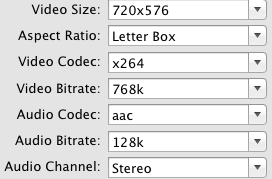
None of them have DRM, and the bitrates used are pictured below.
Any ideas?
How do you guys put movies on SD cards?
Thanks-Jake
I have a few videos that I loaded on an SD card to have in the vehicle.
Unfortunately only 2 of them play - both from YouTube.
The rest just tell me "... is damaged" and they get greyed out in MMI.
All the videos can be played just fine on a Mac or Windows.
I converted them to MP4 on a Mac and removed all the ._ files from the card.
These were all converted from larger format iTunes files to the 720x576 max size that Audi specifies.
None of them have DRM, and the bitrates used are pictured below.
Any ideas?
How do you guys put movies on SD cards?
Thanks-Jake
Last edited by jakematic; Jun 10, 2012 at 08:28 AM.
Thread Starter
AudiWorld Super User
Joined: Feb 2011
Posts: 2,883
Likes: 5
From: NC USA
Seems to be an issue with resolution of the video.
Transcoded an Audi commercial I love to 480x270 iPod Touch format and it worked fine.
Now re-encoding some movies overnight and will try again in the morning.
Transcoded an Audi commercial I love to 480x270 iPod Touch format and it worked fine.
Now re-encoding some movies overnight and will try again in the morning.
Thread Starter
AudiWorld Super User
Joined: Feb 2011
Posts: 2,883
Likes: 5
From: NC USA
Well... that didn't work. ARGGG!
Looking at some of the files, the bitrates and size don't seem to matter that much.
One file was way larger than originally thought and one had a very high bit rate.
The only thing that was consistent between those that wouldn't play was an additional codec: Text
Assuming that is for subtitles.
On the upside, anything that could be played was able to be imported into the Jukebox.
I've got half a mind to re-encode these with ffmpeg at the command line since you can more finely control the options there.
Looking at some of the files, the bitrates and size don't seem to matter that much.
One file was way larger than originally thought and one had a very high bit rate.
The only thing that was consistent between those that wouldn't play was an additional codec: Text
Assuming that is for subtitles.
On the upside, anything that could be played was able to be imported into the Jukebox.
I've got half a mind to re-encode these with ffmpeg at the command line since you can more finely control the options there.
Thread Starter
AudiWorld Super User
Joined: Feb 2011
Posts: 2,883
Likes: 5
From: NC USA
Solved
Notice: I do not condone the concept of DRM, nor the removal thereof to pirate works of art.
If you chose to remove DRM you are on your own and I will not tell you how.
DRM was removed for my personal use only, from legally purchased media.
Be honest and don't steal other people's work !!
The tool that I used to remove the DRM did some funky things with the stream mapping at encoding time.
Audio was mapped to S0 as AAC - ffmpeg users will understand what that means.
Based on this thread and others in the Q7 & A7 forums I pieced it together.
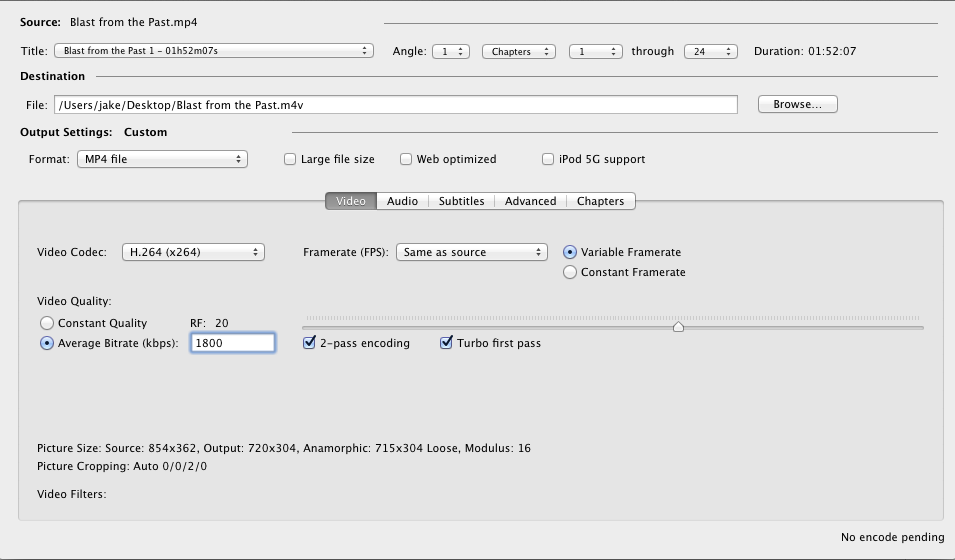
The key is to re-encode with something like Handbrake set to Universal, and bitrate set to 1800kbps.
Two pass encoding of course makes the video look better.
I tried iPhone/iPod Touch but the quality was too low for my tastes.
Settings that worked:
If you chose to remove DRM you are on your own and I will not tell you how.
DRM was removed for my personal use only, from legally purchased media.
Be honest and don't steal other people's work !!
The tool that I used to remove the DRM did some funky things with the stream mapping at encoding time.
Audio was mapped to S0 as AAC - ffmpeg users will understand what that means.
Based on this thread and others in the Q7 & A7 forums I pieced it together.
The key is to re-encode with something like Handbrake set to Universal, and bitrate set to 1800kbps.
Two pass encoding of course makes the video look better.
I tried iPhone/iPod Touch but the quality was too low for my tastes.
Settings that worked:
Last edited by jakematic; Jun 11, 2012 at 03:56 PM.

AudiWorld Senior Member
Joined: Dec 2011
Posts: 714
Likes: 0
You need us for this thread buddy?
Seems to be an issue with resolution of the video.
Transcoded an Audi commercial I love to 480x270 iPod Touch format and it worked fine.
Now re-encoding some movies overnight and will try again in the morning.
Green Police
Transcoded an Audi commercial I love to 480x270 iPod Touch format and it worked fine.
Now re-encoding some movies overnight and will try again in the morning.
Green Police
K9
Thread Starter
AudiWorld Super User
Joined: Feb 2011
Posts: 2,883
Likes: 5
From: NC USA

AudiWorld Super User

Joined: Sep 2001
Posts: 2,721
Likes: 0
I assume then that you have video in motion set up? I had VIM on my Q5 nut have not tried it on our new 2012 A8L yet. Sounds like it is more efficient to rip movies to an SD card that use the dvd changer.
Trending Topics
AudiWorld Stories
Bringing Audi to Life for Audi Fans

Top 10 Most Expensive Audis Ever Sold on Bring-A-Trailer
Brett Foote
10 Audi Features & Options We Miss the Most!
Joe Kucinski
Audi Recreates Crazy-Looking Speed Record Breaker From 1935
Verdad Gallardo
Coachbuilder Recreates the 1995 Audi TTS Concept
Verdad Gallardo
Every Audi V10 Car Ranked!
Joe Kucinski
9 Audi Designs That Aged Like Fine Wine
Verdad Gallardo
2026 Audi Q5 Buyer's Guide (Every Model Explained)
Brett Foote
Ranking Every Current Audi 'S' Model From Worst to First!
Joe Kucinski
10 Best Audis That are FINALLY LEGAL to Import to the U.S.!
Joe Kucinski
Thread Starter
AudiWorld Super User
Joined: Feb 2011
Posts: 2,883
Likes: 5
From: NC USA
Absolutely better to put them on SD card in my opinion and you can still copy them to the jukebox from SD.
Not that I'm aware of.

Thread
Thread Starter
Forum
Replies
Last Post
Blade Hunter
Audio, Video and Security Discussion
1
Mar 29, 2018 08:02 PM
BSK
A4 (B5 Platform) Discussion
0
Nov 15, 2005 04:29 PM
bmwslayer
S4 / RS4 (B5 Platform) Discussion
0
Dec 19, 2001 01:22 AM
SmokeyA4turbod@ebay
A4 (B5 Platform) Discussion
2
Nov 21, 2001 04:56 AM
